A DETAILED GUIDE TO ECOMMERCE SEO FOR AN OPTIMISED ONLINE STORE
The en-masse shifting of consumers to online platforms has made eCommerce SEO a magic spell for the highest ROI. SEO is the most feasible and pocket-friendly technique out there for sustainably increasing your sales.
The science behind SEO is to resonate the content on your product page with the user’s intent. Only then can you win the top spots and eventually make more money. Ecommerce SEO might seem tedious but it’s all about understanding what the user is looking for and how the search engine will cater to their needs.
We have designed this complete eCommerce SEO guide for your WowCommerce store. Even if you don’t have WowCommerce, you can still apply the steps to your online eCommerce store and attract more traffic.
How SEO makes a difference for eCommerce stores?
SEO is undoubtedly a vital digital marketing tool but it’s a multi-faceted process and you need to understand it to make the most out of it. Before we get into “HOW”, it’s important to discuss “WHY” eCommerce SEO is the holy grail to a successful online store.
Your ranking decides your visibility
The right eCommerce SEO steps will allow you to show up on the top pages of search results and enhance your visibility. The higher you rank on the search result, the more likely your link will be clicked and it will improve your organic ranking.
Elevates your web traffic
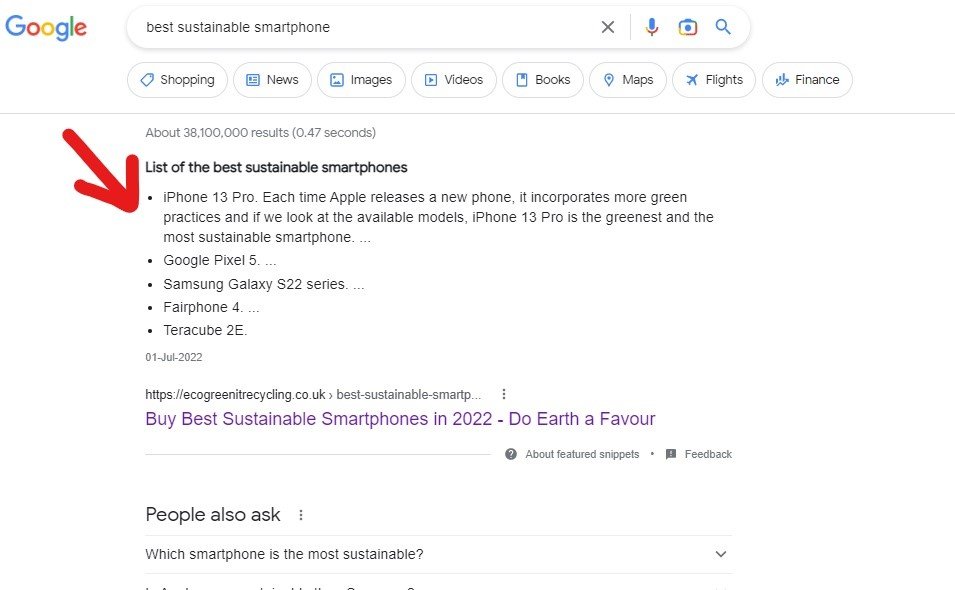
According to Backlinko, 32% of the clicks on your website are generated from Google and moving up a spot increases your clickthrough rate by 30.08%. The content on your blogs and landing pages can win you a spot on the featured snippet which is called the #0 ranking as it shows above the #1 search result.
Moves up your Page Authority (PA) and Domain Authority (DA)
Is your website trustworthy? Does it offer something relevant? Is it high-quality? A higher PA and DA means you have all these qualities and that’s the goal that businesses must be focused on.
Improves the user experience
All the time you spend on making your site SEO optimised improves the quality of your site and ensures a better user experience for the visitors. The faster your page load speed is, the lower the bounce rate is. That will eventually improve your conversions and increase your sales. You should always opt for an eCommerce provider that offers fast platforms to ensure the best experience for your customers.
Ecommerce SEO best practices for the three phases
There are three phases of eCommerce SEO; technical on-page and off-page SEO. All of them must be dealt with equal attention to get the best results. This guide will separately explain each section in detail.
1. Technical SEO
Technical SEO is not an immediately obvious type of eCommerce SEO but leaves dramatic effects on the ranking and performance of your website. It involves loading page speed, optimisation for crawlers, mobile friendliness and many more aspects. The best part is that it will optimise your site for human users for the best user experience. What is the structure of the site, is the internal linking done properly, and how are the meta tags doing? All of it comes under technical SEO.
Here are the technical SEO steps to perfect your website.
Craft the perfect sitemap
A Sitemap is a file that has all the information about the structure of your website including all the pages, videos and files. This sitemap guides search engines about the important pages of your website so they crawl the site more efficiently.
We can call it one of the most underrated eCommerce SEO strategies but it gives the best results. This allows you to tell the search engines where to move the potential visitors and improves the rankings of those specific pages. This way you get to dictate the traffic to the page they are looking for.
You can select a site map generator for your website from Google Sitemap Generator and Yoast Plugin. At WowCommerce, we offer a dynamic sitemap where you can get help from Yoast and Google.
Add Robots.txt file
Robots.txt is a simple text file at the root of your site directory to guide the robots on the pages of your site that you want them to discover. It includes instructions about pages they can and cannot crawl by allowing and disallowing this function. There are a set of instructions in this file for the crawlers to visit first. Even if you want all the pages to crawl, it’s good practice to add this page.
Here are the steps to follow:
- Locate your sitemap by adding /sitemap.xml to the URL of your website. The sitemap URL for wowcommerce.co.uk is https://wowcommerce.co.uk/sitemap.xml.
- Add /robots.txt after your URL to locate your Robots.txt file. As in the case of WowCommerce, it is https://wowcommerce.co.uk/robots.txt.
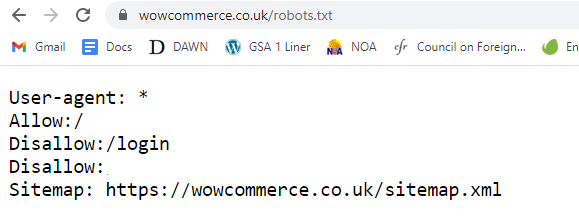
- Add sitemap location to Robots.txt file. It will look like this.
- You can use the Robots rules by allowing and disallowing different pages.
Connect your site with the Google search console
Google search console allows you to maintain and monitor your organic site presence, site traffic, keyword performance, the position of queries and page ranking. It ensures that your pages are eligible for rich snippets. You can submit sitemaps to track page-wise and keyword-wise performance. You get to know if there are any technical errors on your website. It also notifies you about any strikes from Google.
You can add your sitemaps to the search console by following the steps given below:
- Create an account on Google Search Console.
- Enter your website domain to add property.
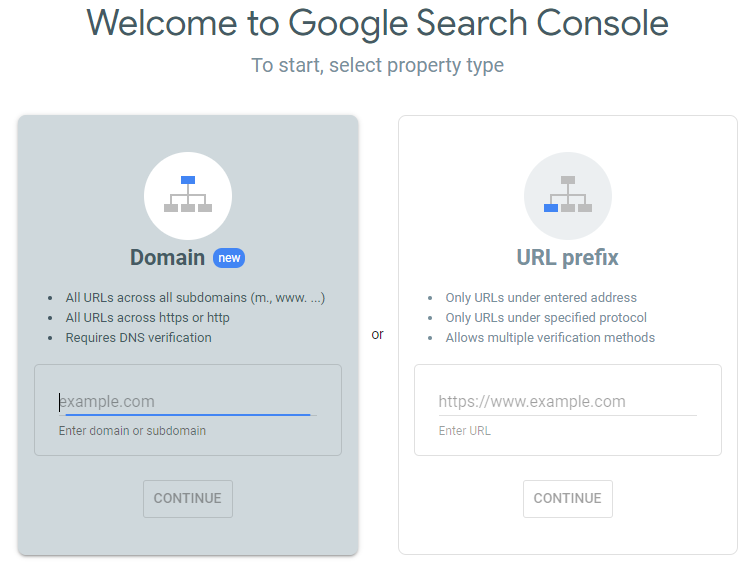
- For a URL prefix property, enter the URL with the prefix and press Continue.
- Verify your domain and prefix property for the first time.
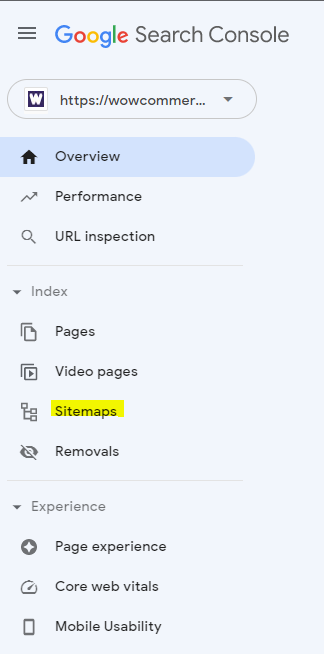
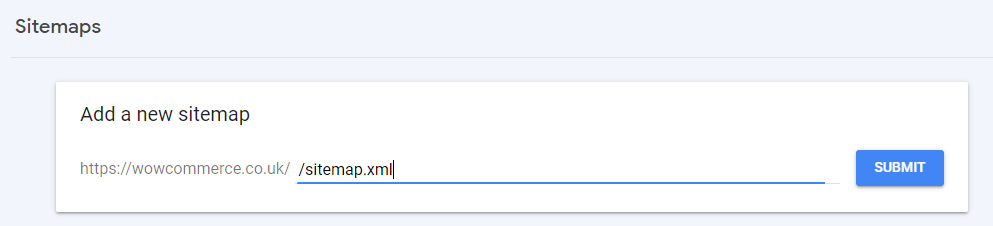
- Go to Sitemap on the left panel as shown below
. 
6. Add a new sitemap and submit it for indexing.
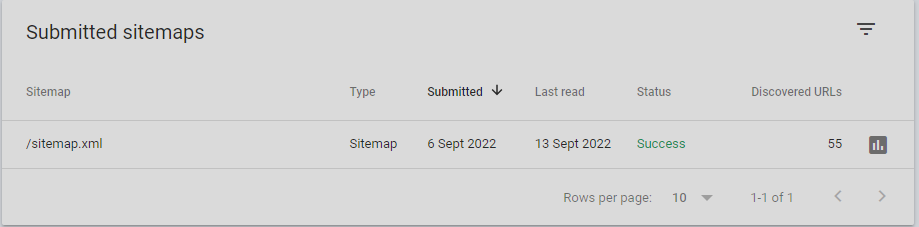
7.Track the performance of your website and improve accordingly.
Google Analytics
Google Analytics helps you identify trends and patterns of visitor engagement on your website. You can track conversion and find your target audience. With Google Analytics, you will be able to improve online advertising by understanding user behaviour with easy data visualisation and reporting.
To optimise your site based on results checked from Google Analytics, start by creating an account and adding property. When you sign in to your Google Analytics account, you see three portions that are account, property and view. You need at least one account, a property, that can be a website or a mobile app property with a unique tracking ID and lastly, a view to access your reports and track performance.
Here are the steps to add a property and check website stats.
- Sign in with Google and choose an account. Select a website that you would like to add as a new property.
- Click Admin in the left bar and select “Add Property”.
- A new screen will pop up where you will have to enter a property name, reporting time zone and currency.
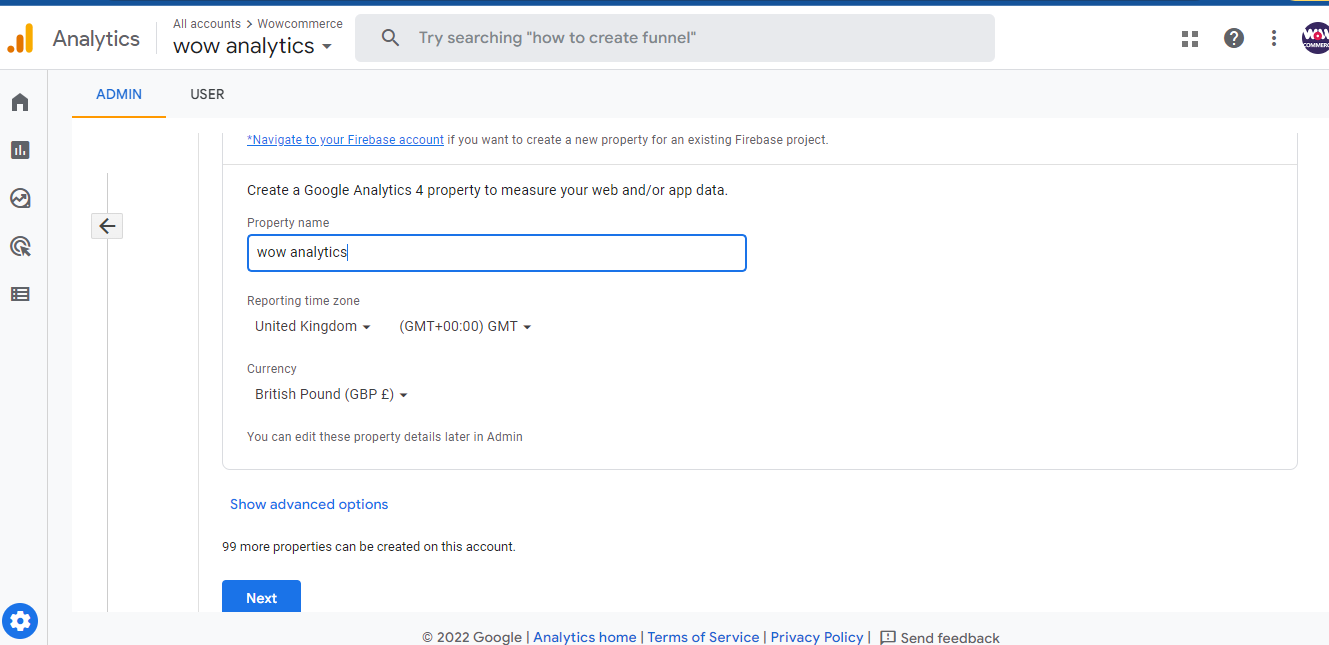
- Click on advanced options and enable “Create a Universal Analytics Property” and enter your website URL. Select “Create a Universal Property only” and then click Next.

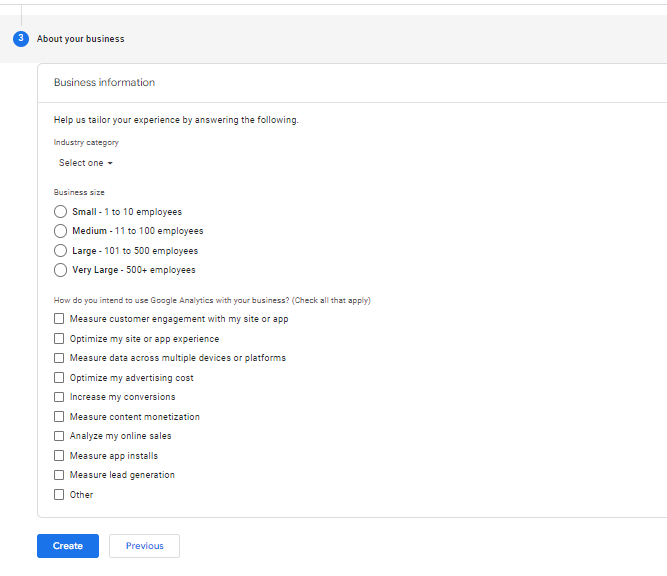
- Enter the information about your business and click “Create”.
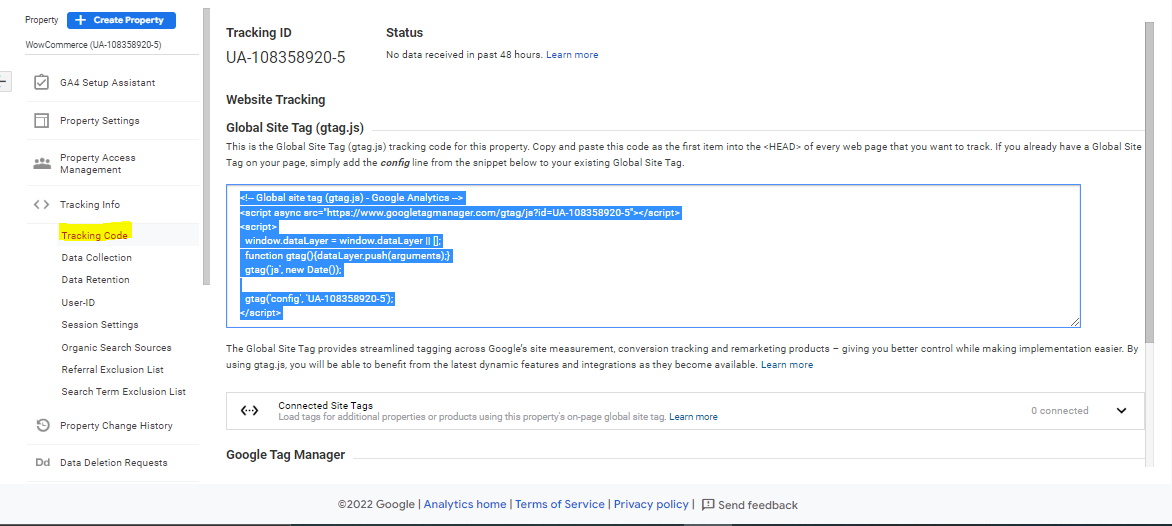
- Add your Google Analytics code to use in the header of your homepage.
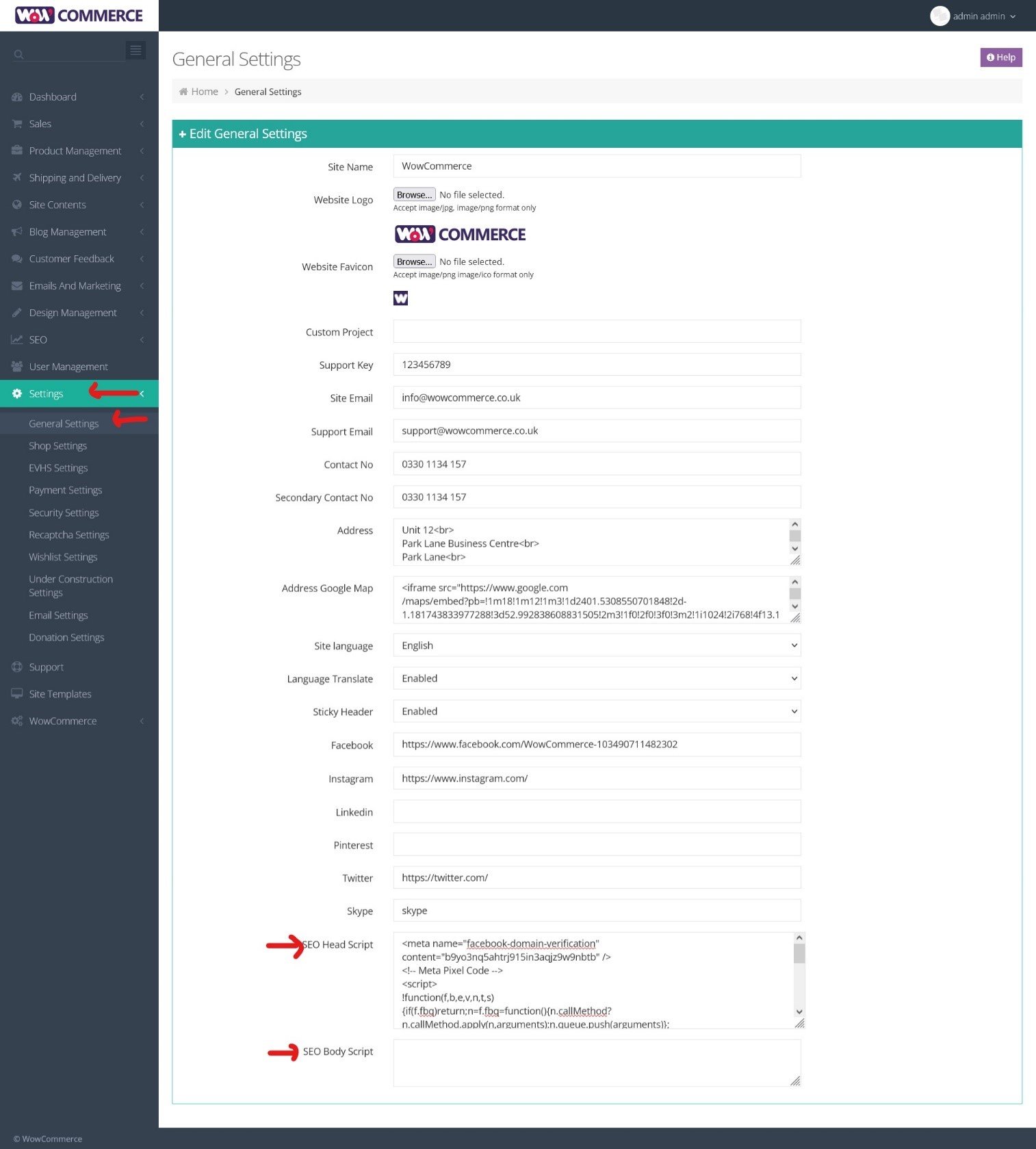
Here is how you can do it in WowCommerce solutions:
- First go to Site Settings
- Select General Settings
- Add SEO Head Script and SEO Body Script in the given sections.
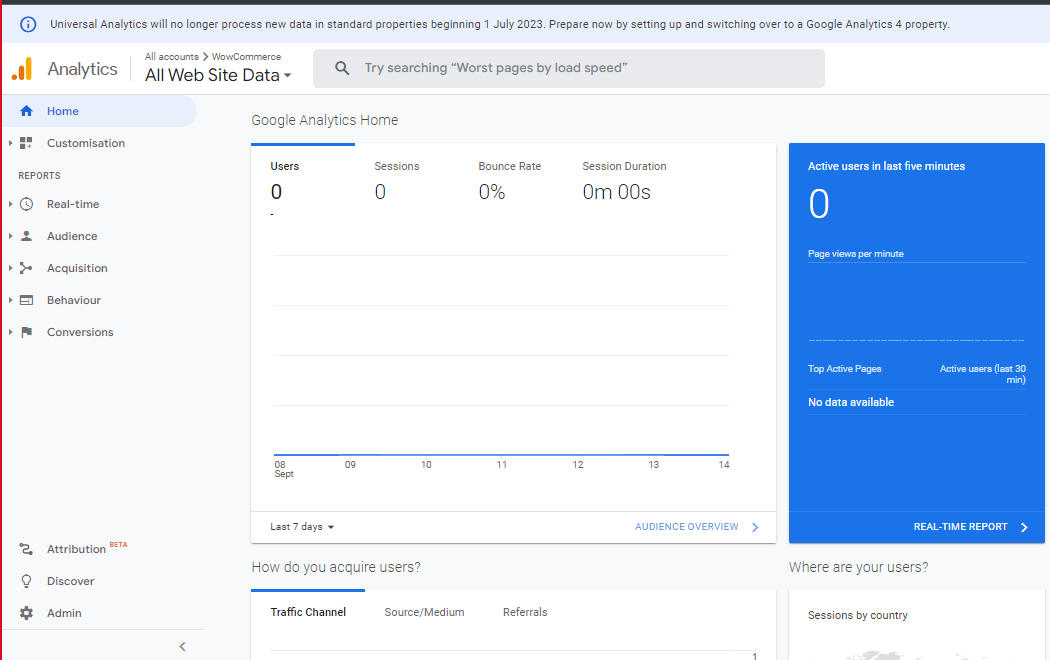
Here you can track your Audience, Acquisition, Behaviour, Conversions and other stats.
Google Analytics 4
Add Google Analytics 4 Property
1. Login to your Gmail account and go to the GA4 Assistant.
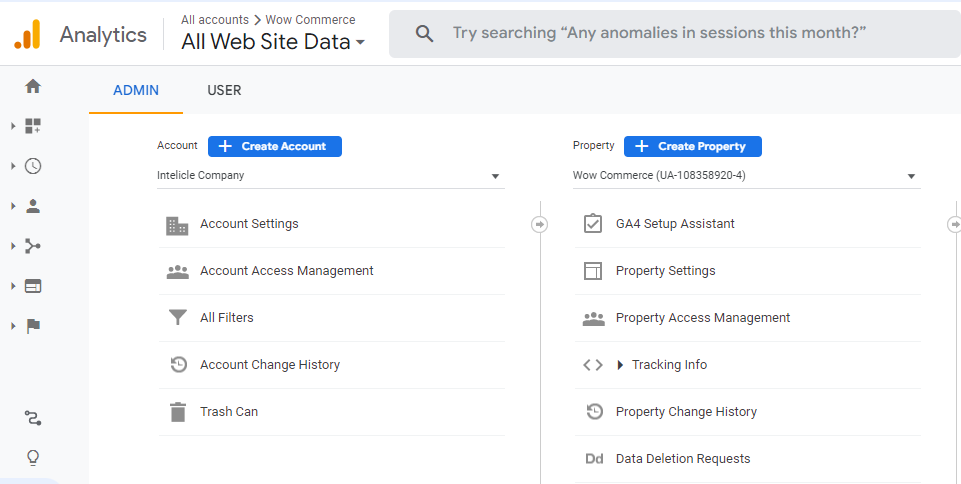
2. Click on Get Started to add Google Analytics 4 Property Setup Assistant.
.PNG "google analytics 4 setup")
3. The setup assistant will provide its steps, click Create and Continue.
.PNG "google analytics 4 setup")
4. Your property is successfully added. Click on Go to your GA4 property to access.
.PNG "Go to your GA4 property")
Submit your website to Bing Web Master
Here we will discuss how you can submit your website to Bing Web Master Tool through Google Search Console verification.
1. Head over to https://www.bing.com/webmasters, click “Get Started”, select Google and choose your Google Account associated with Search Console. .PNG "bing account setup")
2. Now choose the Google Search Console option and select “Import”, navigate down and click “Continue”.
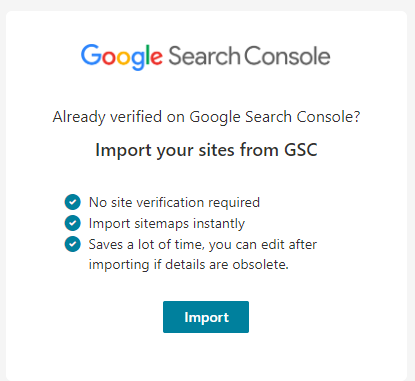
3. Choose the Google account again and click “Allow”.

4. Make sure your website is selected and then come down to click “Import”.
5. Your site has been added to Bing Web Master Tool, select Done.
6. You can navigate the search performance after 48 hours.
Get rid of the duplicate content
Search engines never appreciate duplicate content so ensure that your category pages and product descriptions are unique. There is a chance that search engines will penalise your website if it has too much repeating content. You can use plagiarism checker tools to find the duplicate content. There are some free tools such as Small SEO tools, and Duplichecker but you can also go for paid tools for more authentic results such as Copy Scape.
Craft unique pages and separate them from the website to rank as a high-quality site for any search engine. Use canonical URLs if the descriptions are the same as explained below.
Use canonical URLs
It tells search engines which URL you want to appear in your search results. In case you have the same pages on your website because of some requirement, your canonical URLs will help search engines not to mark it as duplicate.
Without tagging a master page, search engines will not be able to distinguish those pages and it can affect your SEO results. Canonicals are a way of telling search engines your preferences and it is crucial for your eCommerce SEO.
Here is how you can add canonicals in WowCommerce Product Pages:
1. Click on Product Management and select Products.
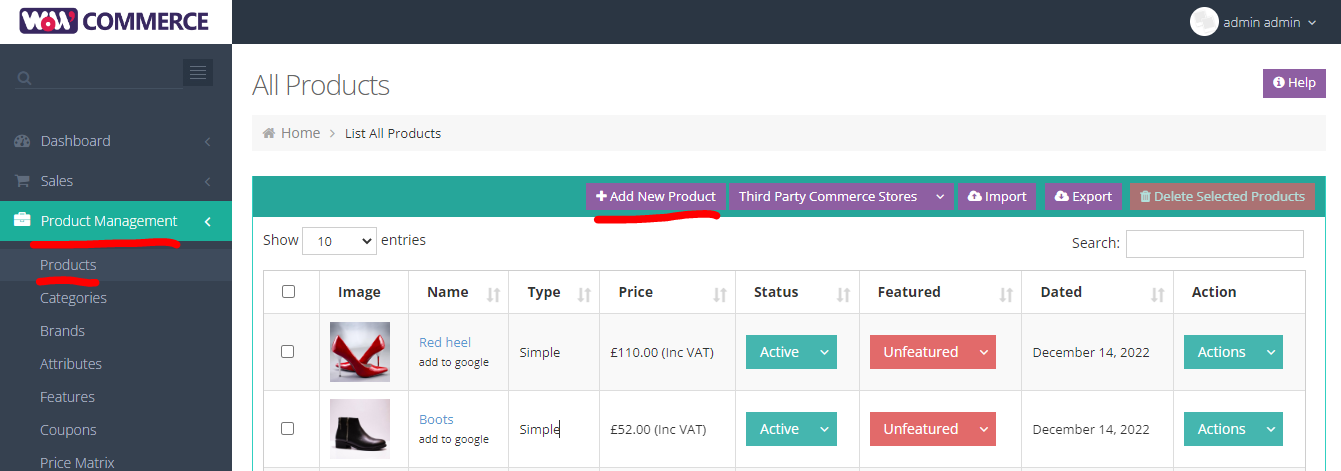
2. Click on “Add New Product” or edit an existing product and this page will appear.

3. Scroll down and go to SEO Details. Here you can add the canonical URL.
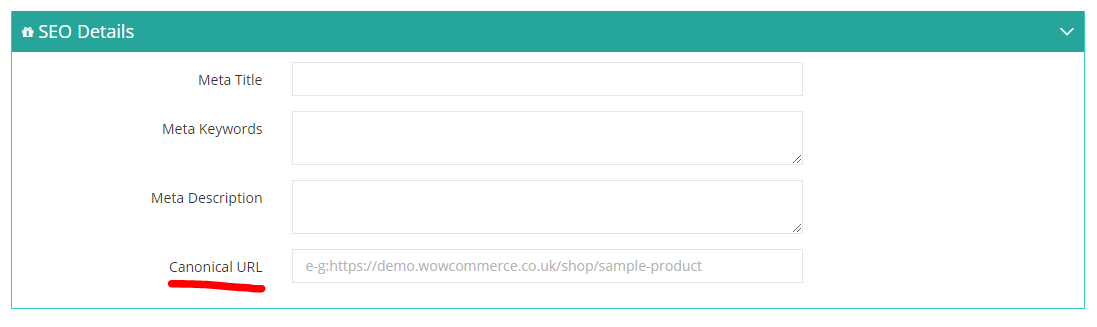
Here is how you can add canonicals to the website Pages in your WowCommerce website:
1. Go to Site Contents and click on Pages.
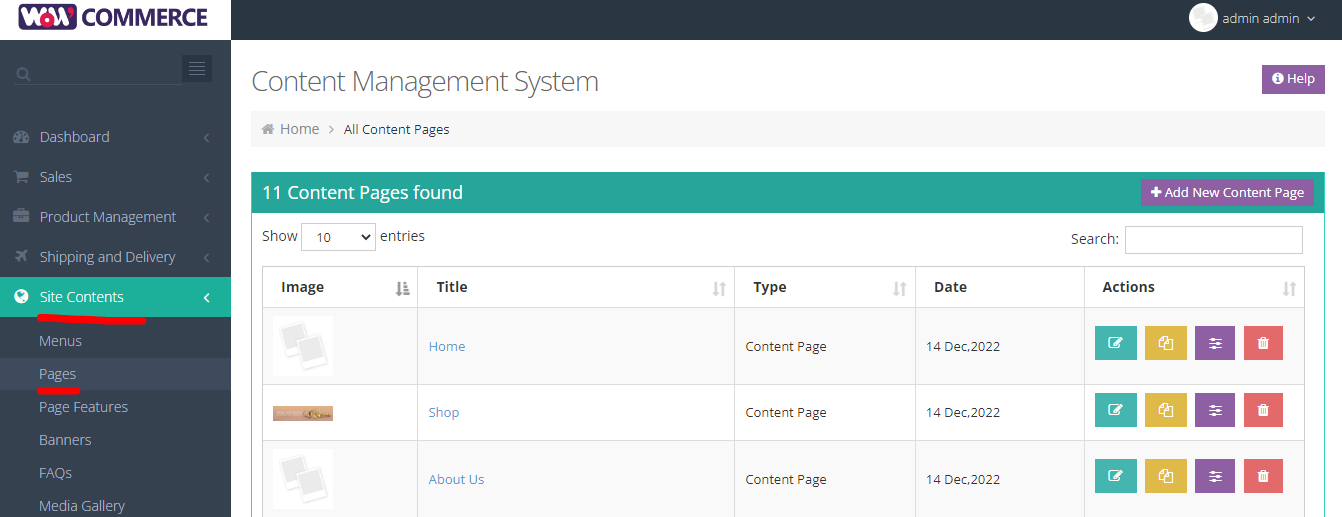
2. Now you can Add New Content Page or edit the existing ones and this page will appear.
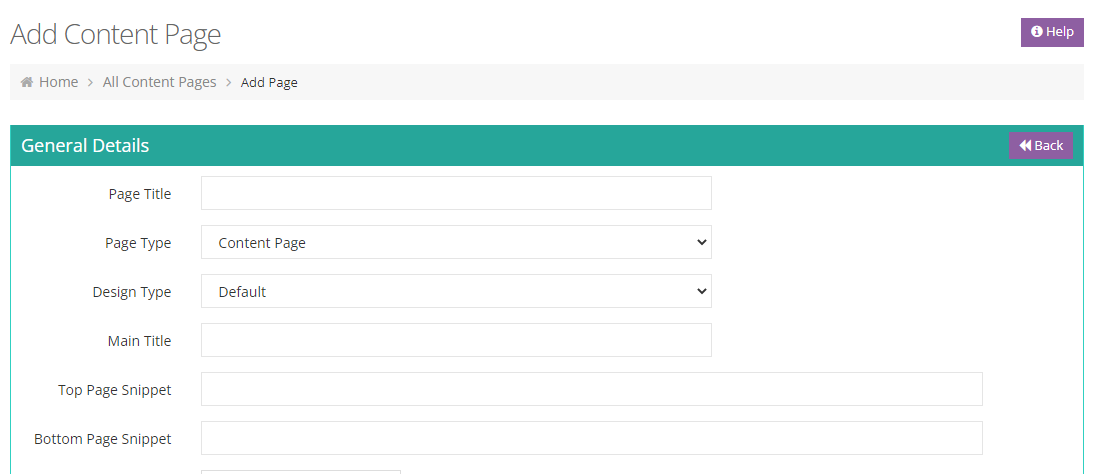
3. Now scroll down and click on CMS data and select SEO Information. Add your canonical URL in the given box.
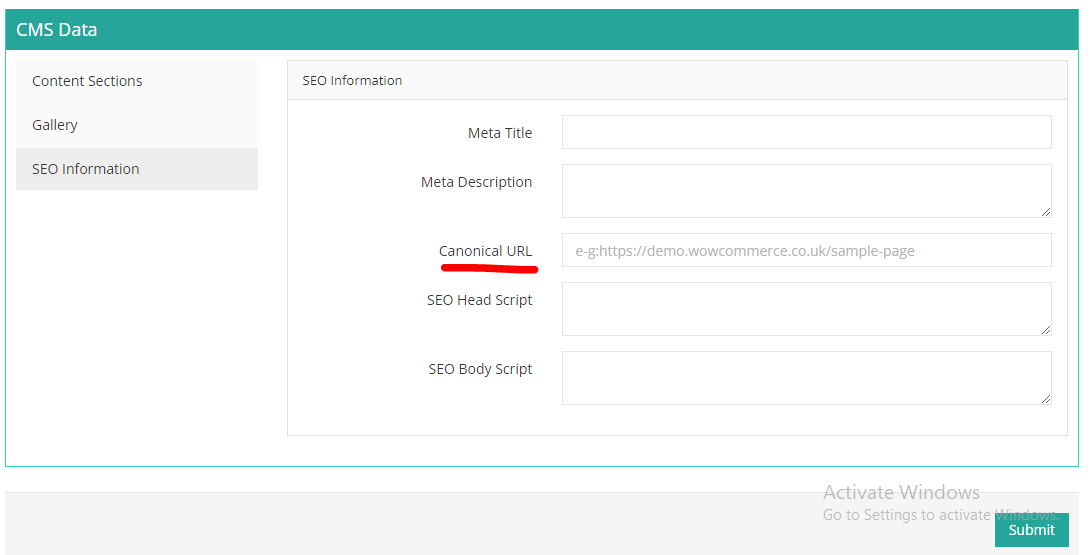
4. Submit and you’re good to go.
Don’t be afraid to redirect
Redirects are a way of changing the landing page of a URL different from what was originally requested. Multiple factors determine if you should use redirection for eCommerce SEO. One such example is when your old product link is already indexed with search engines but you have offered a new product in its place, you can redirect the old page to the new one with the same link.
Make sure that there is a connection between your old URL and the new one because search engines will check it for relevance and it can affect your ranking. You can use redirect checkers to see where the link lands and analyse 301 vs 302 redirects.
- 301 Redirects: This redirect indicates that the page has permanently moved to a new location.
- 302 Redirects: This redirection indicates temporary movement of the page location.
Attract search engines with schema markup
Schema markup is a form of structured micro-data vocabulary that can enhance your description once added to your page. It helps search engines understand the information available on your web pages and improves the ranking in terms of relevancy.
Here are the steps to use schema markup
- Go to Google Markup Helper and select the type of data from the listed options. Paste your markup URL in the box below.
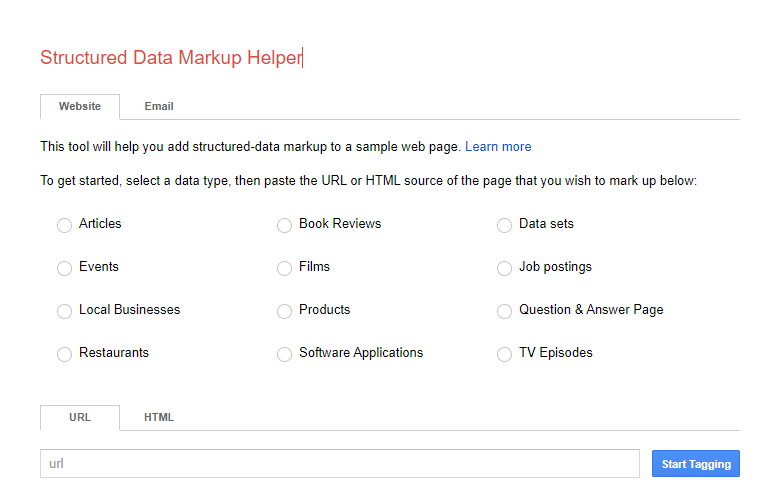
- Select the elements and the tool will add the data items into the selected pane.
- After adding all markup items, you can create HTML and see the micro-data in places that you’ve added it.
- Add this schema markup to your site. Download the HTML file and paste it into your CMS so that the search engine can read it.
- Now that you’re done, use the Schema Validator to check if you did it right.
- For WowCommerce, the schema will be automatically added as you will create product pages.
Fast loading speed is a must
Your website speed is essential to help you rank and improve the user experience of each visitor. A delayed loading website increases the chances of bouncing off. A study shows that 51% of users will not complete a purchase if a site is too slow. Your site should ideally take 3-5 seconds to load for the best results.
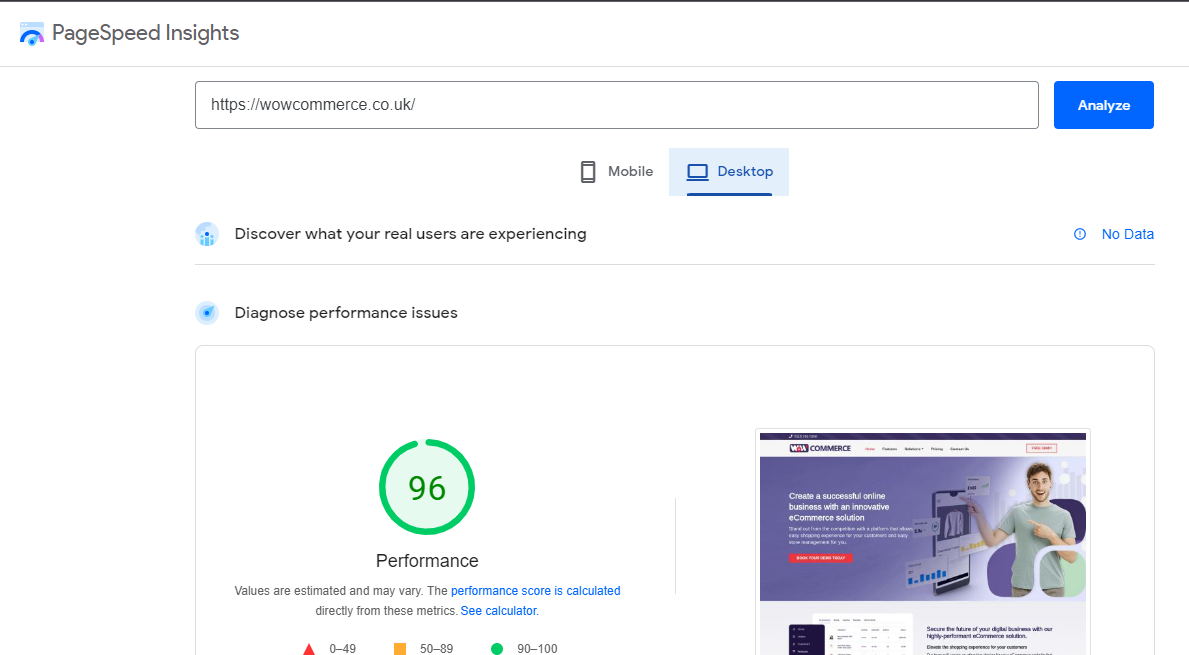
You can go to Google Page Speed Insight tools to get an idea of how can you improve the loading speed of your eCommerce website. Search engines will give you a rating for your mobile and desktop loading speed and also provide the steps to improve the speed. You can also use GTMetrix to see the performance of your website and discover why it’s slow.
WowCommerce makes sure the speed of your online eCommerce store is optimised and you don’t face any issues of bouncing visitors.
Create a mobile-friendly website
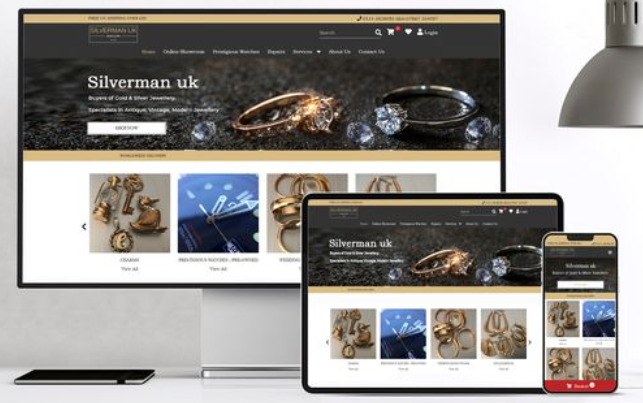
Many factors make your eCommerce solution website mobile-friendly and you must keep track of all of them. One common mistake most people make is the wrong-sized images added for all types of devices. Different sizes of images are required for different devices and can make a huge difference when the device is changed. You can use Google’s Mobile Test to check your performance or go for Lambda Test to see how your site appears on different devices.
Here is a comparison showing how different devices need the right size of the image for their display and the same image will not necessarily fit all.
2. On-page SEO
On-page eCommerce SEO is the practice of optimisation of your web page to rank higher. It is about the site content, the architecture of your site, and the right keywords at the right places. On-page is a way of precisely telling a search engine what you are offering and what your page is about.
Here are the factors that are involved in ranking your webpage and how you can use them to win the top spots on search results.
Get a spot-on architecture of your website
Your website must present the most relevant content to the potential customers in the least number of clicks. That is what your site architecture is about, providing what they are looking for in the easiest way possible. E-commerce architecture deals with the eCommerce structure of your website and how it will show your category pages, navigation and product pages.
Here are comparison images of good vs. bad site architecture to give you an idea about how your pages need to be connected with the most relevant and important pages accessible most easily.


Keyword research is the uncrowned king of SEO
Keywords can make or break your eCommerce SEO ranking so you must put special effort into finding the right keywords and using them in the right places. This is what a person looking for your product will type in the search bar.
If you have the matching keywords, you are more likely to appear as the top result and increase traffic, conversions, sales and eventually profits. This shows how keywords are the most basic but crucial key to a successful online business.
There are two types of keywords:
- Short-tail keywords are two or three words long with a high volume so it’s difficult to rank against such keywords but not impossible. E.g., Running shoes.
- Long-tail keywords comprise four or more words, generally with lower volume but higher relevancy. Combining such keywords along with your short-tail increases your chance of appearing on the top search results. E.g., If you sell shoes online, you can work with keywords such as “running shoes for men” and “running shoes for women”.
Here are some ways you can research new keywords online:
- Keyword research tools: There are several free as well as paid keyword research tools that you can get help from. The best paid tools for keyword research are Ahref, SemRush, KWFinder, GrowthBar and many more. There are also some free tools for keyword research such as Google keyword planner, Neil Patel, Keyword Surfer and LSI Graph.
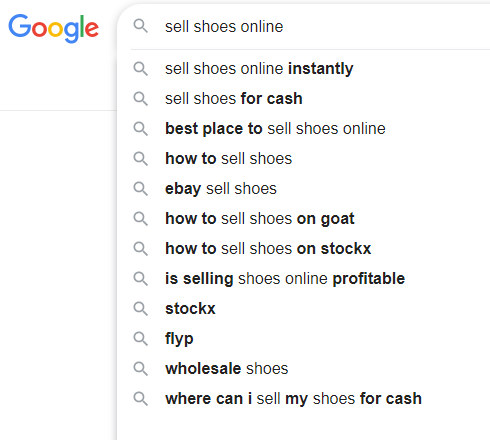
- Google suggestions: Search for relevant words on the Google search bar and use the suggested options as your keywords. Check the example below for selling shoes online.
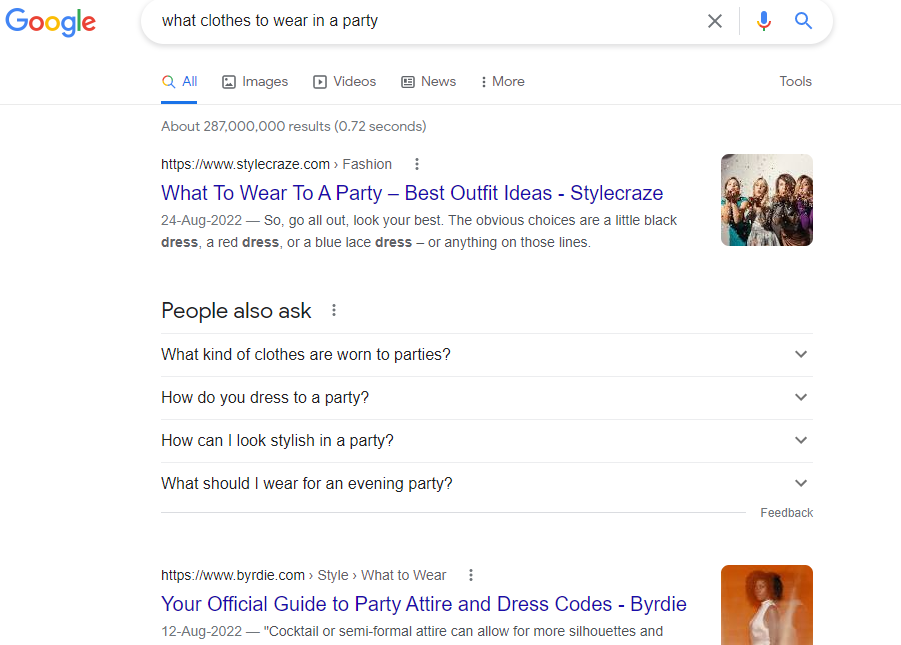
- Google Results: You should also search the keywords to see what type of results come up to understand which keywords will work for your eCommerce store. Make sure of using relevant keywords and perform your research to understand what works for you the best. Here is an example to show you which keywords show eCommerce stores and which ones just suggest blogs if you sell clothes online. When you search for “What clothes to wear in a party?”, it will show the results of different blogs.
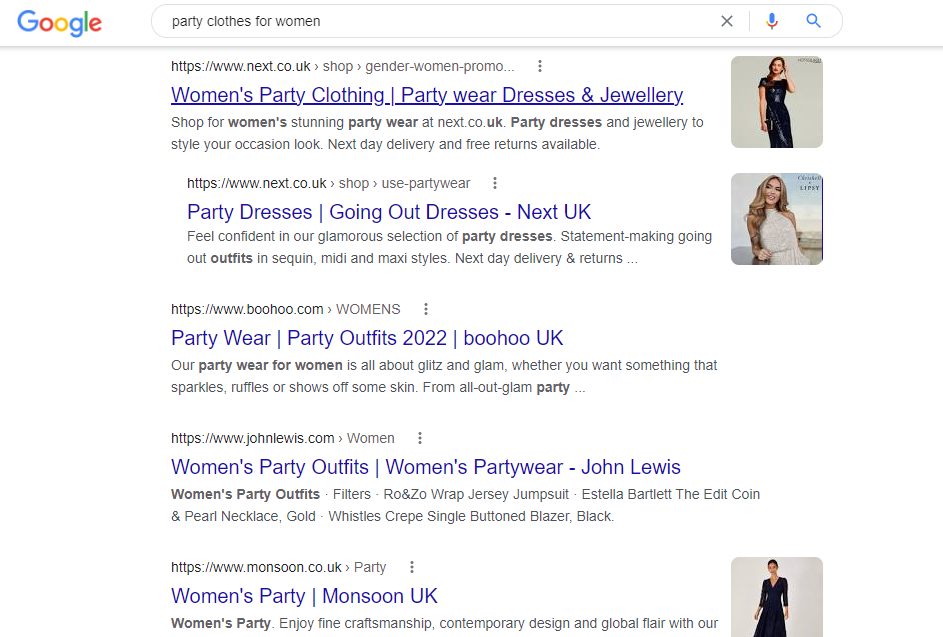
But, when you search for “party clothes for women”, it will show the eCommerce store selling party clothes for women. This is how you know which keyword to use for your product page.
- Amazon Suggestions: Search for the relevant keywords for your products on Amazon and use the suggested keywords for your product page because all of them can be your potential focus keywords. Here is an example of online blinds businesses.
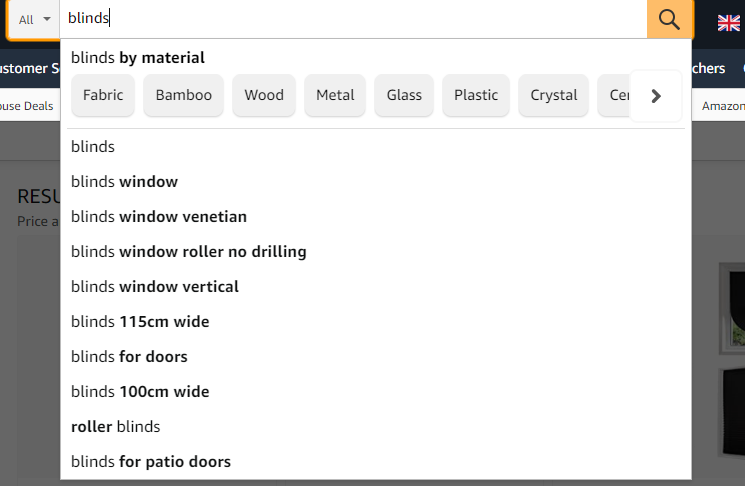
Here are a few factors about any keyword that you must keep in mind while choosing a keyword as a focus.
- Keyword competition refers to how difficult it is to rank against a keyword on search engine search results. You can use a combination of keywords with higher and lower competition
- Search volume: The higher the search volume of your keyword is, the more there is potential to attract more traffic to your webpage.
- Relevancy: Make sure your keyword is relevant to your product page and perfectly algins with the page that it’s leading to.
- Intent: Target keywords that show your sales intent. For example, if you sell furniture online, “L-shaped couch” shows your search intent, not “wall paintings”. Check out this guide on how to sell furniture online for more help.
Bring product marketing into play
It is really important to follow the marketing trends for your products on social media. It allows you to attract traffic from different platforms and not just rely on search engines. When traffic is reaching your page through links, it improves your eCommerce SEO performance as well.
Put special effort into your product pages
- Write the best product description
The first and foremost thing on the product page is your product description. Make sure to explain your product in the best way possible and include all the features. Put special emphasis on your selling point here that elevates you from your competitors. Here you will have to keep all your keywords in mind and use them throughout the content.
- Getting the title and slug right
There is no actual limit for the title but an average of 50 to 60 characters is considered to be good for eCommerce SEO. Make sure that you are using your keyword in the title and the earlier it’s used, the better. Keep your title catchy, relevant and specific. Make sure to mention your company name at the start and create the title for the user. It must explain the main features of your product with the right long-tail keywords.
You should also create a short slug between three and five words for a unique URL for your product page. Mostly, it’s better to use just the focused keyword of your product or make it a long-tail keyword to avoid repetition.
- Meta descriptions work wonders
A compelling and captivating meta description has the power to increase your click rates and eventually improve sales. So, make sure to explain in detail what you are offering, and use the right words and terms to attract the user and increase conversions.
Meta description must be kept between the limit of 50 to 160 characters. The optimal length would be approximately 155 to 160 characters. Keep it long enough to be sufficiently descriptive about your product page. The most important thing is to add relevant keywords in the meta description because it makes or breaks the deal in terms of eCommerce SEO.
- Ensure the right use of headings and subheadings
Headings and subheadings on your product page break it down into readable pieces and make it easy for the user to understand what you’re offering. After the title, give bullet points to explain each feature. You can add subheadings for each section and include the specifications in detail. Make sure that you are using your keywords throughout the headings and subheadings for better SEO performance.
Here is an example of the usage of headings and subheadings on a product page.
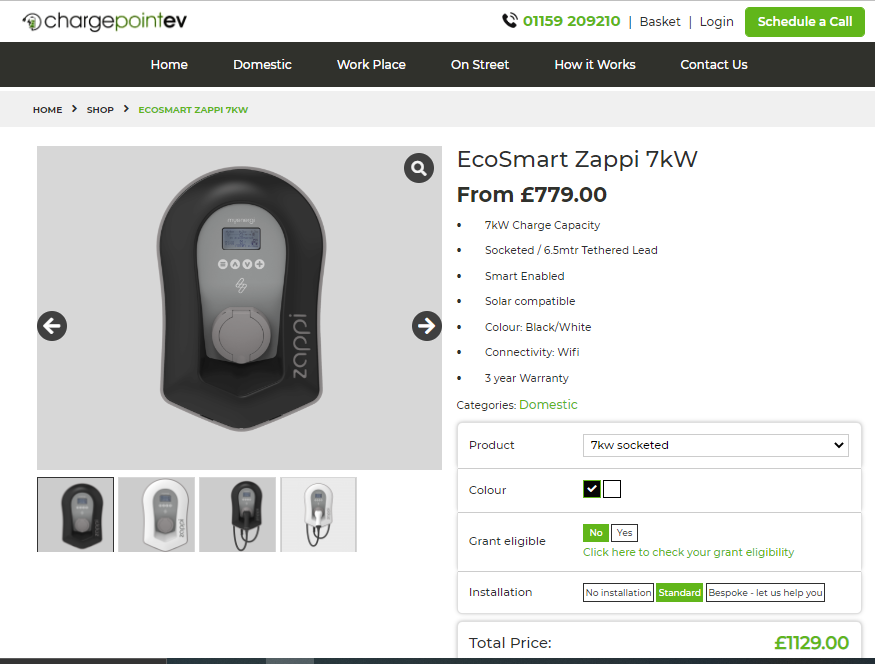
EcoSmart Zappi 7kW (chargepointev.co.uk)
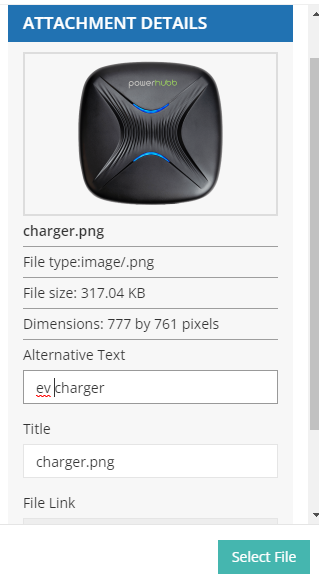
- Don’t miss the alt text for images
Always add alternate text for each image you post of your product so that you attract users from the images section of search engines as well. One essential thing is to mention keywords in the alt text of the images so that they truly depict what they stand for and take the user to the relevant page to buy your product.
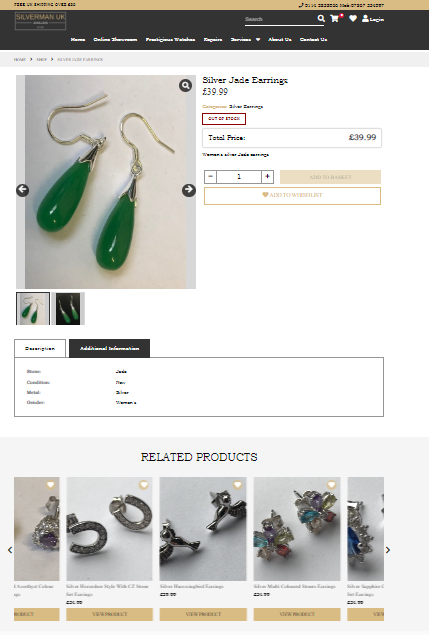
- Related products and internal linking
Make sure to internally link different product pages to offer your users an integrated list of products that they can buy altogether. Make sure to include related products under each product because it not just makes upselling possible but jumps up your eCommerce SEO performance.
- Display your social share button
On your product page, it is better if you display your social buttons. It allows the users to follow you on social networks and later when you share the products, sales and news, they get to know about it. This way you increase your sales and they can buy products at discounted rates. A win-win situation on both ends.
Importance of blogs and keyword usage
No one can ignore the importance of blogs because a relevant blog can drastically improve your position in the search results. When you publish different blogs related to your products and add internal links to those products, it increases the chance of their purchase. For example, someone who wants to start a candle business online can work on a candle blog and guide the audience on how they can make the best use of their candles and other products.
Blogs also allow you to add external links and improve the credibility of your site. Make sure that you are linking to useful resources for the audience.
This way you have more chances to appear on top results by targeting different keywords and eventually guide the users to the product pages.
Off-page SEO
Off-page eCommerce SEO is as important as any other type because it indirectly works in favour of your website and helps you rank better. Here are the ways you can optimise your off-page SEO.
Design a strong backlinking strategy
A strong backlinking strategy is essential because backlinks are a way to tell search engines about your credibility and trustworthiness. Here are some backlinking strategies that can help you:
- Create shareable content: Content is essential for attracting traffic but 90% of the webpages don’t get any traffic because of a lack of backlinks. Try to add stories backed by original data, expert interviews about a matter and ultimate guides on your niche topics to get more backlinks.
- Build broken links: Find all the backlinks in your sector that don’t work anymore and fill these gaps with replacement content. You can use Ahref Broken Link Checker Tool for free to find such links. Now you will have to use the backlinking checking tool and see all the websites that are backlinked to the broken link. Now all you need to do is write a replacement article for the broken link and win back all the lost backlinks.
- Chase brand mentions: You will have to check for all the brand mentions and chase them for a backlink. You can use the Ahref content explorer tool to search for brand mentions by third parties and get links. Google Alerts is also great to check daily posted content to find any mentions.
- Forum discussions: Find different forums and participate in discussions related to your services and products to connect with the community. You can reply to different threads, solve problems of people and offer suggestions and advice on matters related to your niche. Don’t forget to use a complete profile with an anchor in the signature. Try to use forums that allow do-follow links.
- Influencer outreach: You can market to a new audience by leveraging influencers via Buzzsumo to request their valuable insight by feedback or review.
- Competitor backlink analysis: For your backlink strategy, it’s important to analyse your competitor’s backlinks via tools such as Ahref, Moz or Majestic. Understand what type of backlinks your competitors have developed and begin link-building for yourself in the same way because why reinvent the wheel?
Test the magic of local SEO
Local eCommerce SEO is getting higher ranks on search results and reaching out to more local customers. This helps you target the people living in your locality to find the products and services you are offering.
Here’s how you can optimise your store for local SEO.
- Perform business listing by setting up a Google My Business profile or Bing Places for Business with all the necessary information including your contact number, website link and pictures. This way your profile can show up on Google local search results and you can communicate with the local audience via different posts for upcoming sales and events.
- Local directories are really helpful so build citations on local directories like Yell, Yelp, Facebook, Scoot and UK Small Business Directory to show up as a popular local store and increase your audience.
- Make sure that your NAP information (name, address, phone number) is consistent throughout all platforms on the internet.
- Add schema markup (as explained above) to make search engines understand that your NAP information is not just a bunch of words but your name, address and phone number.
- Make sure to get customer reviews and regularly respond to them. Even negative reviews can be helpful if people see constructive engagement in them.
- Getting backlinks from other local businesses and websites can help you boost your local eCommerce SEO ranking.
- If you follow these steps, you can effectively reach top search results for a local audience and increase your local visibility which is more efficient and generates higher conversions.
- Guest posts are always a plus .
- Guest posts are a way of getting high-quality backlinks. There are many platforms accepting guest posts so you must look into such opportunities because they can give a boost to your eCommerce SEO.
Here are the reasons why you should always get the help of guest posting for better eCommerce SEO.
- It helps you develop your business authority and build trust.
- The number and quality of backlinks will help you get a better ranking.
- Guest posts increase your organic traffic by allowing you to reach a whole new audience.
- It increases your brand awareness and visibility.
- It will divert targeted and high-quality traffic to your website.
- Guest posts expand your network and enhance your reputation. Since the guest posts are shared on social media, you will boost social media shares and expand your subscribers.
To be your best at guest posting, here are some tips that you can follow for the best results.
- Be clear and concise with your author bio.
- Make sure to include at least one link to a previous blog on your site.
- Don’t forget to add a call-to-action that can be for leaving comments or getting your services.
- Promote your guest post on your social media accounts as well.
- Keep a follow-up of the traffic coming from your guest post.
Exploit the social media platforms for your benefit
Social media is one of the most important platforms to make the best use of your business model for eCommerce and make a difference. You can use social media in different ways, such as:
- Offer a solution to some problem
- Provide information on a certain topic for educational purposes
- Entertain your followers
- Connect with people on an emotional level
Here is the importance of social media and how it can influence your eCommerce SEO and help you grow your business:
- It allows you to extensively distribute content on different platforms.
- Your posts get a longer lifespan because people can reach them long after they are posted.
- Social media allows you to attract more traffic and improve your online visibility.
- It enhances your brand recognition and reputation.
- It will boost your local eCommerce SEO and help you rank.
Here are some social media tips that you must follow:
- Always publish high-quality content that makes a difference.
- Make sure to post useful content on social media such as product pictures, campaign videos, infographics and blogs.
- Increase your brand awareness with positive mentions by local influencers and brands.
- Optimise your images for SEO and social media.
- Build relations with your audience through active conversations.
- Make it easy for users to share your content and build such opportunities.
- Follow a theme and stick to it for the aesthetic flow of content.
- Use relevant hashtags under each post to make sure that it reaches the right audience.
- Follow trends and collaborate to be talked about.
Social media is a magic tool to boost your eCommerce SEO efforts and uplift your overall brand image.
Partner up with the search engines for the best results
SEO is one of the top factors why traffic is coming to your website. You can never ignore its importance so might as well join the trend and use it for your benefit. This eCommerce SEO guide covers all the aspects of eCommerce SEO that you must know so make sure you are not missing anything.
Give attention to technical SEO and improve your website but don’t forget to optimise your website with on-page SEO and off-page SEO as well. This way you will not leave blank spaces in your SEO strategy and earn the trust of search engines to win top search result spots.
About the Author: Daniel Sebastian

With diverse experience, Daniel Sebastian excels in crafting compelling narratives tailored for online start-ups. His expertise lies in distilling complex ideas into engaging content and guiding emerging businesses throughout the journey of establishing a solid and resonant online presence. Visit Facebook page to get in touch with him and keep abreast of emerging e-commerce trend